
Millions of homeowners get an escrow analysis statement every year, and most of them stare at it with the same confusion: The payment changed, the letter doesn't explain why in plain terms, and nothing on the page tells them whether that's normal.
Escrow accounts hold funds for property taxes and insurance, costs that shift with the market. When those costs rise or fall, so does the required escrow balance. The analysis lays it all out, but in the kind of language that can make even experienced homeowners feel lost.
We wanted to change that. So when Apple released the Foundation Models framework as part of iOS 26, our team saw an opportunity: What if we could put a knowledgeable, patient explainer right inside the app, one that reads the client's actual numbers and delivers a plain-language summary in seconds?
We built that explainer.
The problem: Finance speaks its own language
Our goal wasn't to replace the data. It was to translate it. Clients shouldn't need a financial background to understand why their payment changed. They should be able to tap a button and get a clear, human-centered explanation tailored to their escrow, not a generic FAQ.
The approach: On-device intelligence.
When we evaluated our options, on-device AI via Apple's Foundation Models framework stood out for a few reasons.
Privacy by design: Escrow data is sensitive financial information. Running inference on device means that data never leaves the client's phone. No round-trip to a backend, no third-party model calls. Just Apple Intelligence running locally.
No added latency: Fetching the escrow analysis already involves a network call. The summary generation happens after that, on device, with no additional server dependency.
iOS platform native: The Foundation Models framework fits naturally into our application architecture. We weren't bolting on an external SDK; we were building with Apple's own tools.
The feature is gated to iOS 26.0+ and requires an Apple Intelligence-capable device. We handle both gracefully.
The implementation
A client staring at a confusing escrow bill needs a clear answer fast. Every choice below, on-device inference, context-aware prompting, and streaming output, was made with that in mind.
Detecting availability
Before showing anything, we check whether Apple Intelligence is ready:
@available(iOS 26.0, *)
private let model = SystemLanguageModel.default
private var showButton: Bool {
    switch model.availability {
    case .available, .unavailable(.appleIntelligenceNotEnabled), .unavailable(.modelNotReady):
        return true
    case .unavailable:
        return false
    }
}
If Apple Intelligence isn't enabled or the models are still downloading, we show the button but disable it, along with a helpful message explaining what the client needs to do. If the device doesn't support Apple Intelligence at all, we hide the button entirely. No dead ends, no confusing states.
Building a context-aware prompt
The escrow summary isn't generic. We inject the client's actual data (estimated expenses, actual expenses, and the resulting direction) directly into the prompt. The Foundation Models framework’s @Generable annotation lets us pass typed Swift structs into the prompt rather than hand-crafting strings. The @Guide macro allows us to give the model context regarding the types and their properties:
@available(iOS 26.0, *)
@Generable
struct EscrowChanges {
    @Guide(description: "The estimated expenses for the analysis period")
    let estimated: EscrowExpense
    @Guide(description: "The actual expenses for the analysis period")
    let actual: EscrowExpense
}
We then branch the system prompt based on the outcome (shortage, surplus, or no change) so the model is told exactly what happened rather than having to infer it from raw numbers.
The full system prompt instructs the model to write at a fifth-grade reading level, use headers and bullet points for scannability, avoid financial jargon, recommend reviewing the PDF for the full picture, and always encourage the client to contact support if they have questions. We also embed Rocket's voice and tone guidance directly into the prompt so the output feels consistent with our brand.
Streaming the response
Rather than waiting for the full response before showing anything, we stream it:
let response = languageSession.streamResponse(to: prompt)
return response.map { snapshot in
    snapshot.content
}
In the view model, we iterate over the async sequence and update the UI incrementally:
for try await line in result {
    explanation = line as? String
}
This keeps the experience feeling fast and responsive. Clients see text appearing, a signal that something is happening, rather than staring at a spinner.
Caching for repeat views
On-device inference has a cost. If a client dismisses the summary sheet and reopens it, we don't regenerate. We cache the result and serve it immediately:
if !force, explanationProvided, let explanation {
    self.explanation = explanation
    return
}
The force parameter lets us support a "Try again" path if the client wants a fresh summary.
Handling errors gracefully
If inference fails, whether from memory pressure or an interrupted session, we catch the error, log it for our engineers, and show a fallback message:
} catch let error {
    eventLogger.warning(
        name: "EscrowAnalysisSummaryError",
        metadata: [.errorDescription: error.localizedDescription]
    )
    explanation = EscrowAnalysisConstants.summaryFailureMessage
}
The client never hits a blank screen or a crash. They see a clear message and can still access their full escrow data.
The UI
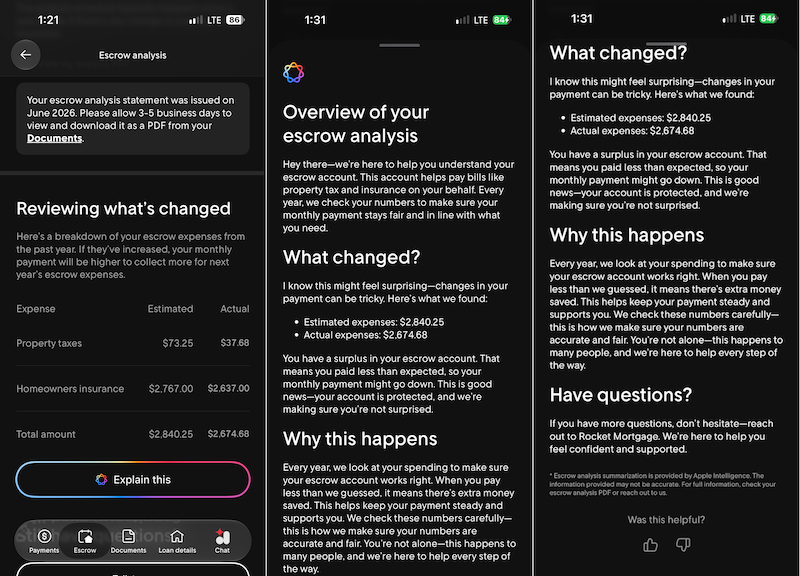
The summary lives in a bottom sheet that slides up over the escrow analysis view. It leads with the Apple Intelligence logo, rendered with Apple's signature animated gradient, followed by the markdown-formatted explanation.
At the bottom, clients can tap a thumbs-up or thumbs-down to tell us whether the explanation was helpful. We track that feedback through analytics alongside availability events and engagement metrics. It gives us a direct signal on quality that we can act on as the models evolve.
The "Explain this" button itself uses IntelligenceContent.Button, a shared component we built so that any future Apple Intelligence features in the app will have a consistent, branded entry point.
Results
In the last 90 days, more than 93,000 unique clients saw the "Explain this" button in the escrow analysis screen. Nearly one in four tapped it, a 23% engagement rate we didn't have to manufacture with nudges or notifications.
Among clients who left feedback, over 70% gave a thumbs-up. Feedback on in-app AI features usually skews negative, since satisfied users tend to close the sheet and move on while frustrated ones reach for the button. Seeing a 2:1 positive ratio against that backdrop tells us the explanations are landing.
We're watching the feedback trend closely as a quality signal. If a model update shifts that ratio, we'll know quickly and can adjust the prompt accordingly. We use that feedback to catch quality regressions early, especially after a model update.
Based on internal Amplitude data. Data as of August 1, 2026.
What we learned
Getting the Foundation Models framework set up was straightforward. Getting the output to be genuinely useful, the right tone, the right reading level, the right structure, took real iteration. Small changes to the system prompt produced meaningfully different output quality. With initial prompts, we provided the raw client numbers, but were not explicit regarding whether the client had a shortage or surplus. This occasionally led to hallucinations by the model, which produced incorrect output. Once we updated the prompt to be more explicit, these issues went away. Since the Foundation Models framework runs on device, it’s inherently not as powerful as frontier server models, so prompt design is critical to get accurate output.
Early drafts of the feature generated solid explanations, but they read like they could've been written for anyone. Once we injected the client's actual numbers and branched on shortage vs. surplus vs. no change, the output felt personal. Context specificity beat generality every time.
This feature only runs on iOS 26.0+ with Apple Intelligence enabled and models downloaded, which is a large slice of our users, but not all of them. We spent as much time on the fallback paths as on the happy path, making sure that clients who can't use the feature don't encounter confusion, dead ends, or inconsistency. Graceful degradation wasn't optional.
No escrow data ever leaves the device during inference. In consumer finance, where data sensitivity shapes almost every architecture decision, that removes an entire category of concerns. It's a reason to choose on-device inference for similar features going forward.
What's next
This feature is our first integration with Apple's Foundation Models framework, and it's already shaping how we think about AI elsewhere in the app. We're exploring where else on-device intelligence can reduce complexity for clients, not replacing the data they need, but making it easier to understand and act on.
Escrow analysis was a natural starting point: high complexity, high anxiety, clear benefit from plain-language explanation. But the same pattern applies across many moments in the homeownership journey. We're just getting started.

Related resources

4-MINUTE READ
My fulfilling career in data intelligence
Dian, a Director of Engineering in Data Intelligence at Rocket Central, shares her experience working in Data.

3-MINUTE READ
What happens when product teams and AI build together?
As AI moves from solo assistant to collaborative teammate, product teams are discovering new ways to build together. Learn how Rocket Flow connects human expert...

7-MINUTE READ
Sustainable AI: Balancing innovation and eco-responsibility
Explore the environmental impact of generative AI and discover practical strategies for using technology responsibly while minimizing carbon footprint and resou...